
CLARITY BEFORE YOU FILL UP
Your fuel.
Your station.
Fillzz helps you compare fuel prices, find stations on the map and prepare your fill-up. Choose your fuel first, then weigh up the price, distance and available station information.
Download FillzzApp available on iOS and Android.
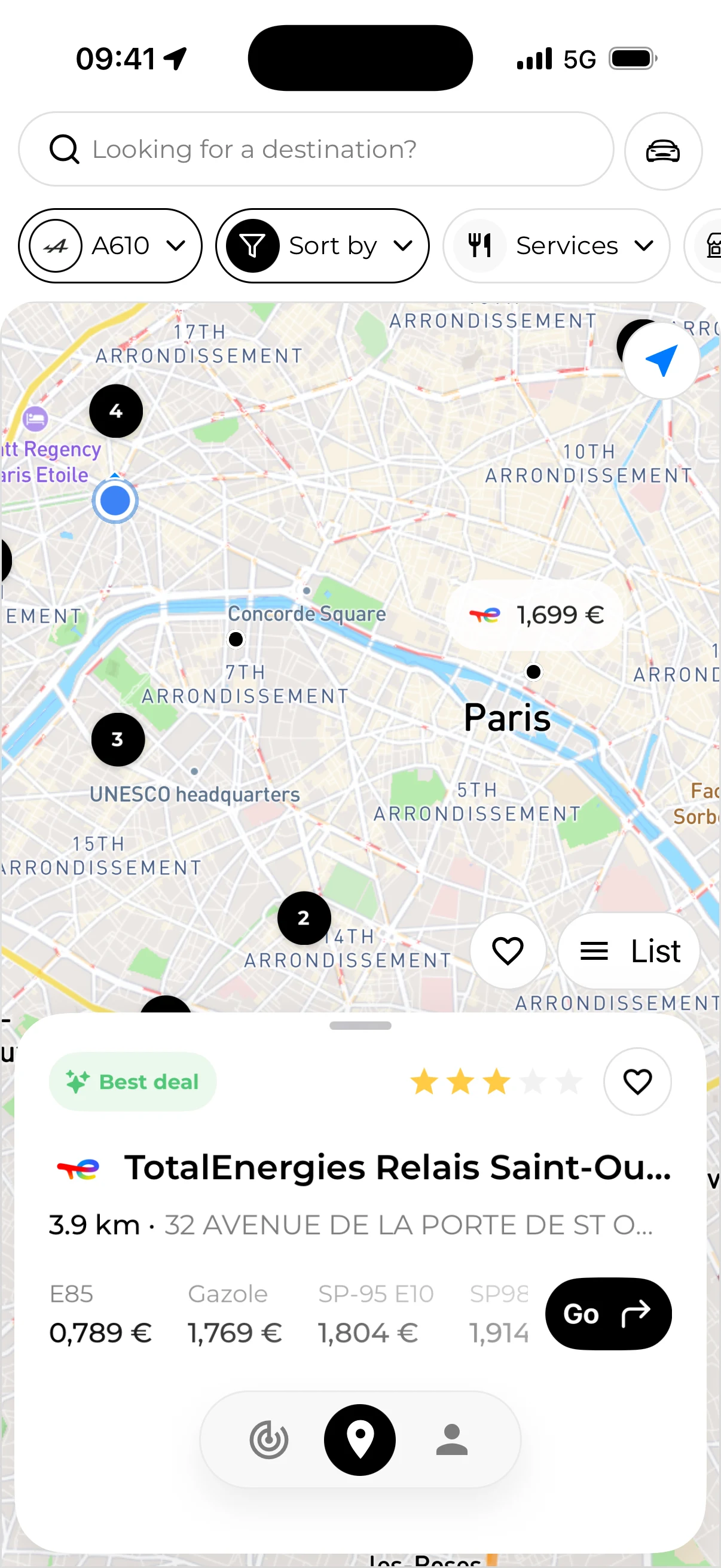
IN PRACTICE
Select your fuel
Add your vehicle or choose the fuel you need. Compare the same category across stations: an E85 price and a premium petrol price do not answer the same need.
Explore stations around you
Browse the map and open stations near you or in the area where you plan to stop. Sorting by distance lets you start with nearby stations.
Check the details, then set off
Review available prices, their dates and practical station details. Once you have chosen, start a route. The map and fuel prices are available in the Fillzz app.
Map, prices and station details: what matters?
A station’s location gives context to your journey. Its page brings together fuels, prices and, where provided, opening hours and services. Check the address too: a station that looks close on the map may take longer to reach by road.
Refine your search with Fillzz Premium
Fuel selection and sorting by distance help you get started. Fillzz Premium adds sorting by price and relevance, plus brand and service filters. You can narrow the search using the criteria that matter for your stop.
Is a cheaper price worth the detour?
The saving depends on how many litres you buy, the price difference and the extra journey. For a small top-up, a few kilometres may absorb the saving. For a larger fill-up, the same price difference carries more weight. Use our calculator to explore your situation.
Return to stations that suit you
Favourites, included in Fillzz Premium, let you find saved stations again. They are useful for regular journeys: return to a station’s details before your next fill-up without repeating the whole search. Review the information again before setting off.
Fillzz refreshes data every 10 minutes. Its availability and freshness depend on the information supplied by data providers. Prices can change before you arrive. Check the price displayed at the pump before refuelling.
ON YOUR JOURNEYS
Two stations, one choice to put in context.
Illustrative example: a €0.10/L difference saves €4 on 40 litres. If reaching the cheaper station adds 10 km, at 6 L/100 km and €1.80/L, the detour uses €1.08 of fuel. That leaves €2.92 in savings, before your time and any other costs.
Calculate a detourFrequently asked questions
Comparing fuel prices.
Can I compare prices without a subscription?
Yes. You can view the map, station details and available prices, select your fuel and sort by distance. Sorting by price and relevance, brand and service filters, and favourites are included in Fillzz Premium.
PricingWhy is no price shown for a fuel?
The provider may not have supplied a price for that fuel at the station. Missing information does not establish that the fuel is unavailable. Review the station details and check with the station if needed.
Our dataIs the displayed price guaranteed when I arrive?
No. Fillzz refreshes data every 10 minutes, but availability and freshness depend on data providers. A price can change between being supplied and your arrival, so check the price displayed at the pump.
Can I search for a station on this website?
Station search and fuel prices are available in the iOS and Android app. This website explains the features, covered countries and practical ways to plan your fill-ups.
DownloadFILLZZ · iOS & ANDROID
Your next fill-up starts here.
Compare, choose, hit the road. Find Fillzz on iOS and Android.